I have tried to get into Linux kernel development two or three times over the past several years. In my case, compiling and installing a new kernel on a piece of hardware I own wasn’t the issue. The issue was a lack of experience and not knowing where to start or what to contribute. I’m sure there are plenty of inspired engineers out there who feel the same and so this blog series serves three purposes.
- To log my progress getting into Linux Kernel development, proper.
- To document my process, progress and insights.
- To provide other engineers with a resource for getting stuck into Linux Kernel Development themselves.
What you get at the end
A single command that boots a kernel you compiled, in a sandbox, in about a second:
vng -r ~/kbuild/net-next --skip-modules --memory 2GPlus an incremental rebuild of a single subsystem directory in under thirty seconds. That is the whole objective.
I am on Ubuntu 24.04 (Noble). Adjust package names if you are elsewhere, but the traps are mostly universal.
Prerequisites
The toolchain itself is unremarkable:
sudo apt install build-essential flex bison libssl-dev libelf-dev bc \
  libncurses-dev pkg-config ccache sparse cscope qemu-system-x86 \
  python3-pip git wget

pip install --user virtme-ng
ccache -M 20G
Two things that are easy to miss on a server install. You need to be in the kvm group or QEMU silently falls back to full emulation, and everything becomes twenty times slower without telling you:
sudo usermod -aG kvm $USER # log out and back inAnd /dev/shm needs to be roughly half your RAM. QEMU backs guest memory with shared memory when virtiofs is in play, so an undersized /dev/shm produces cannot set up guest memory 'pc.ram', which looks like an out-of-memory error and is not one:
df -h /dev/shmThe pahole trap
This one is worth its own heading, because it fails silently.
If you enable CONFIG_DEBUG_INFO_BTF (and you want to, for BPF, bpftrace and drgn) the kernel needs pahole 1.26 or later. Noble ships 1.25. Exactly one release short.
The build succeeds anyway. Everything links. The failure surfaces much later, when a BPF program refuses to load with func_proto incompatible with vmlinux, which reads like a bug in your own code. I lost an evening to this before working out the tool was the problem, not me.
Build it from source:
sudo apt install cmake libdw-dev zlib1g-dev libbpf-dev

git clone --recurse-submodules \
  https://git.kernel.org/pub/scm/devel/pahole/pahole.git ~/src/pahole
cd ~/src/pahole && mkdir build && cd build
cmake -D__LIB=lib -DCMAKE_INSTALL_PREFIX=/usr/local ..
make -j"$(nproc)" && sudo make install && sudo ldconfig

pahole --version && which pahole
--recurse-submodules matters. pahole vendors libbpf, and cmake fails confusingly without it.
Cloning without the timeout
The obvious git clone of mainline pulls roughly four gigabytes in one non-resumable stream. On a flaky connection it will fail at 80%, repeatedly, and there is no way to resume. git has no clone continuation. Since I’m frugal and use my 5G mobile connection along with a custom Mango router to connect to the internet from my Ubuntu Server, this came in useful for me :D
kernel.org publishes a clone bundle on their CDN for exactly this. wget -c resumes, so you just rerun it until it finishes:
wget -c https://cdn.kernel.org/pub/scm/linux/kernel/git/torvalds/linux.git/clone.bundle \
  -P ~/open-source

git clone ~/open-source/clone.bundle ~/open-source/linux
cd ~/open-source/linux
git remote remove origin
git remote add origin \
  https://git.kernel.org/pub/scm/linux/kernel/git/torvalds/linux.git
git fetch origin
git checkout master

rm ~/open-source/clone.bundle
The bundle is a snapshot; the git fetch afterwards pulls only what has landed since it was cut.
Do not shallow-clone. You need full history for git blame, git log -S and for identifying the commit a Fixes: tag should point at (which is most of how you find something worth working on in the Linux source code).
Optional: subsystem trees
If you already know which subsystem you are aiming at, add its trees as remotes on the same repository. Objects are shared, so this costs almost nothing. I am targeting networking:
git remote add --no-tags net \
  https://git.kernel.org/pub/scm/linux/kernel/git/netdev/net.git
git remote add --no-tags net-next \
  https://git.kernel.org/pub/scm/linux/kernel/git/netdev/net-next.git
git fetch net
git fetch net-next
Two details. The netdev trees use main, not master. And --no-tags on trees that tag frequently saves you dragging in thousands of refs you will never use.
Then give each tree its own directory with worktrees, rather than switching branches in one:
git worktree add ~/open-source/linux-net      net/main
git worktree add ~/open-source/linux-net-next net-next/main
Branch switching invalidates your build cache every time. Worktrees do not. Disk cost is one working tree each; history stays shared.
Configuring for development, not for shipping
Start from defconfig, not your distro’s config. Distro configs are enormous, drag in module signing keys you do not have, and turn a ten-minute build into an hour.
cd ~/open-source/linux-net-next
mkdir -p ~/kbuild/net-next
make O=~/kbuild/net-next defconfig
Then turn on what a development kernel actually needs:
./scripts/config --file ~/kbuild/net-next/.config \
  --enable DEBUG_KERNEL --enable DEBUG_FS \
  --enable DEBUG_INFO_DWARF_TOOLCHAIN_DEFAULT --enable GDB_SCRIPTS \
  --enable PROVE_LOCKING --enable DEBUG_ATOMIC_SLEEP \
  --enable KASAN --enable UBSAN \
  --enable BPF_SYSCALL --enable DEBUG_INFO_BTF \
  --enable NET_NS --enable VETH --enable DUMMY --enable NETDEVSIM \
  --set-str LOCALVERSION "-dev"

make O=~/kbuild/net-next olddefconfig
--file is not optional above becauase scripts/config edits .config in the current directory, and we’re building our net-next worktree instead.
PROVE_LOCKING and KASAN cost maybe 30% of runtime and will catch your mistakes before a reviewer does. That is an extremely good trade. LOCALVERSION means uname -r tells you unambiguously which kernel you are in.
Building
export PATH="/usr/lib/ccache:$PATH"
make O=~/kbuild/net-next -j"$(nproc)"
First build, ten to twenty minutes. After that, incremental builds are seconds. If they are not, check ccache -s for hits.
The single biggest loop improvement is building only the directory you touched:
make O=~/kbuild/net-next net/ipv4/That is the difference between a ninety-second cycle and a fifteen-second one.
Layer the checks on when you are ready for stricter checking:
make O=~/kbuild/net-next W=1 C=1 -j"$(nproc)"If you use clangd, generate the compilation database. The symlink is needed because clangd looks in the source root while kbuild wrote it to the output directory:
make O=~/kbuild/net-next compile_commands.json
ln -sf ~/kbuild/net-next/compile_commands.json .
Booting
Here is the thing I did not understand at first: virtme-ng is not an alternative to QEMU. It is QEMU, wrapped. It takes --qemu, --qemu-opts and --disable-kvm if you want to override its choices.
What it actually buys you is that the root filesystem problem disappears. It boots your kernel using your host filesystem as a copy-on-write snapshot, so you get your own tools, your own home directory and your own source tree inside the guest — and you can panic the kernel or delete everything without touching the host. No disk image to build, no second userspace to keep in sync.
vng -r ~/kbuild/net-next --skip-modules --memory 2G
uname -r      # ends in -dev
              # Ctrl-D to exit
Note -r, pointing at a build directory. I would strongly advise against vng --build. Letting vng also manage the build gives you two systems with different ideas about where output belongs, and its generated config is deliberately minimal and it will strip out most of what you just enabled. Keep the roles clean: kbuild builds, vng boots.
--skip-modules skips module staging entirely. If your config has what you need built in, it removes a whole class of failure from the loop.
The best part is non-interactive mode, which turns your test suite into one scriptable line:
vng -r ~/kbuild/net-next --skip-modules --memory 2G -- \
  make -C tools/testing/selftests TARGETS=net run_tests
A few other things that shot me in the foot in the process of getting this working.
I ended up with two variants of virtme installed on my system. One being virtme and the other being virtme-ng. I realised that virtme-init is the legacy Python init while the modern virtme-ng uses virtme-ng-init, a much faster Rust implementation. This was confirmed following:
which -a vng
pip show virtme-ng 2>/dev/null | head -3
apt list --installed 2>/dev/null | grep -i virtme
After a sudo apt remove virtme virtme-ng and making sure the Rust Compiler Toolchain was installed with sudo apt install python3-pip cargo rustc, I did:
git clone --recurse-submodules https://github.com/arighi/virtme-ng.git ~/src/virtme-ng
cd ~/src/virtme-ng
BUILD_VIRTME_NG_INIT=1 pip3 install --user --break-system-packages .| Flags | Purpose |
|---|---|
| BUILD_VIRTME_NG_INIT=1 | Compiles the Rust init and is the whole reason to do this rather than take the APT distro package. |
| —break-system-packages | Combined with —user it installs into ~/.local, touching nothing apt manages. It’s the documented route for modern Python installs. |
| —recurse-submodules | This is required because virtme-ng-init is a submodule of virt-ng and the build silently skips it otherwise. |
Then run export PATH="$HOME/.local/bin:$PATH" to pick up the virtme-ng installation.
Check it’s installed as expected on the system.
which vng
vng --version
ls ~/.local/lib/python3.12/site-packages/virtme/guest/bin/virtme-ng-init
Boot your kernel.
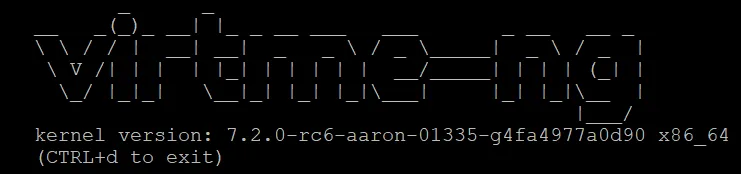
vng -r ~/kbuild/net-next --memory 2G --verbose 2>&1 | tee /tmp/vng.logHopefully you’ve managed to get a running kernel in virtme-ng and you should see a banner like so inside the environment.
Four traps that would cost you evenings
Do not export KBUILD_OUTPUT. Use O= on each invocation instead. Exported, it leaks into every make in that terminal — including mrproper, which then cleans your output directory while the stale files it was supposed to remove sit untouched in your source tree. You get the source tree is not clean, please run make mrproper, you run exactly that, and nothing changes. The fix is env -u KBUILD_OUTPUT make mrproper. The cure is being explicit everywhere.
git clean -xdf, with one f. Double-force removes nested repositories, which takes your worktrees with it. Always read git clean -xdn first.
EROFS is never a virtme problem. .virtme_mods is an ordinary directory of symlinks, not a mount. If writes to it fail read-only, the underlying filesystem was already read-only before virtme ran. THis is usually because the kernel remounted it after an I/O error. Check findmnt -T and dmesg -T | grep -i remount before you touch anything, and if it is a real filesystem error, run git fsck --full on your tree before trusting it.
Silence is not success. The pahole case above is the pattern to internalise: build tooling that is nearly new enough tends to produce a working build and a broken artefact. Check versions against Documentation/process/changes.rst rather than assuming your distro is current.
Done when
uname -r inside the guest reports a kernel you compiled. That is the whole of part one.
What you have built is not a kernel — it is a loop. Everything after this is just changing what goes into it.
Next in the series: choosing a subsystem, reading a tree well enough to find something genuinely worth fixing, and the kernel’s rules on AI-assisted contributions, which are newer and stricter than most people realise.